
Open sourceGoApache 2.0
lasso. Every agent, every machine.
In your pocket.
One binary puts every coding agent on every machine you can SSH to in a browser tab and a phone app, and buzzes your phone the moment one of them needs you.
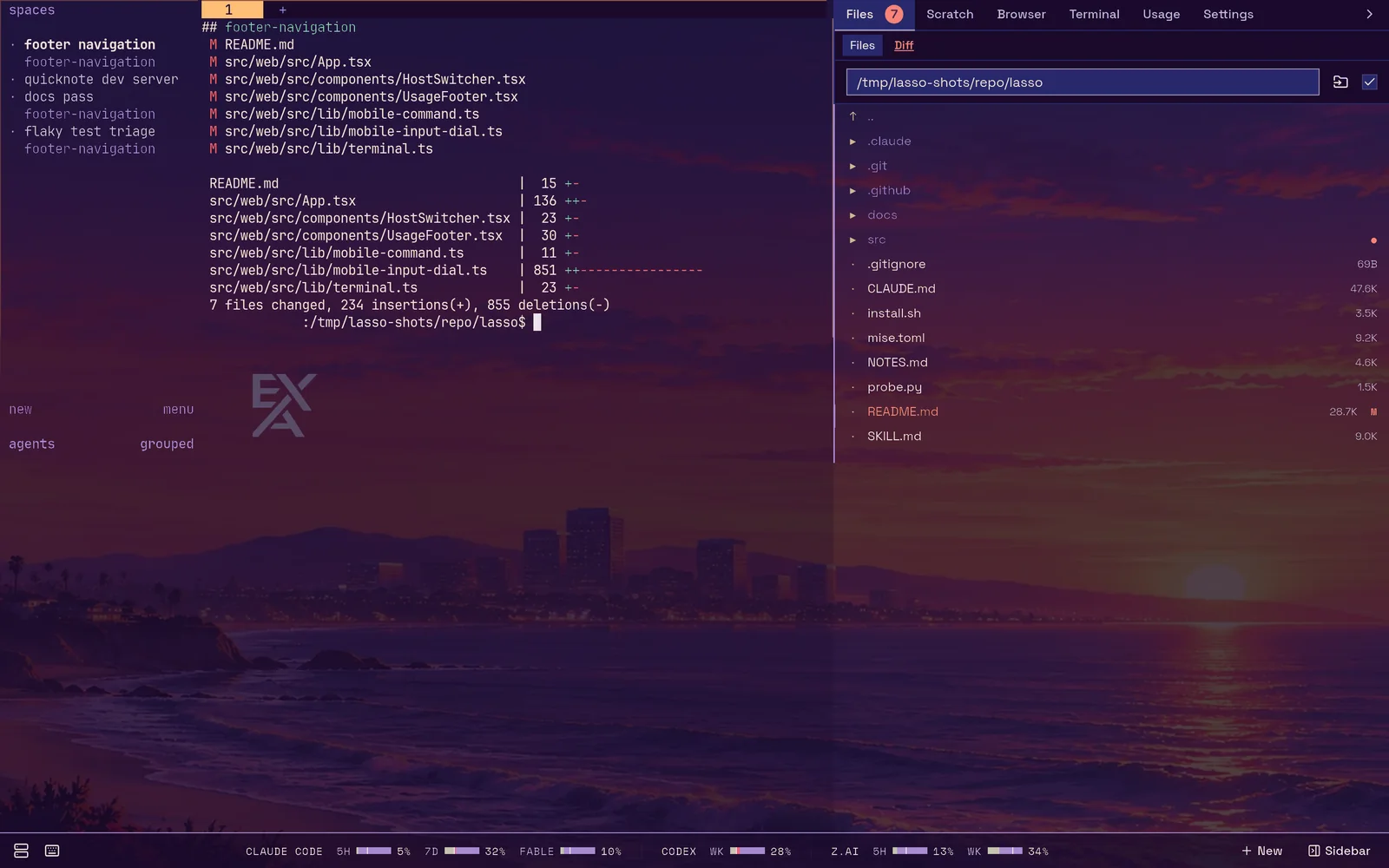
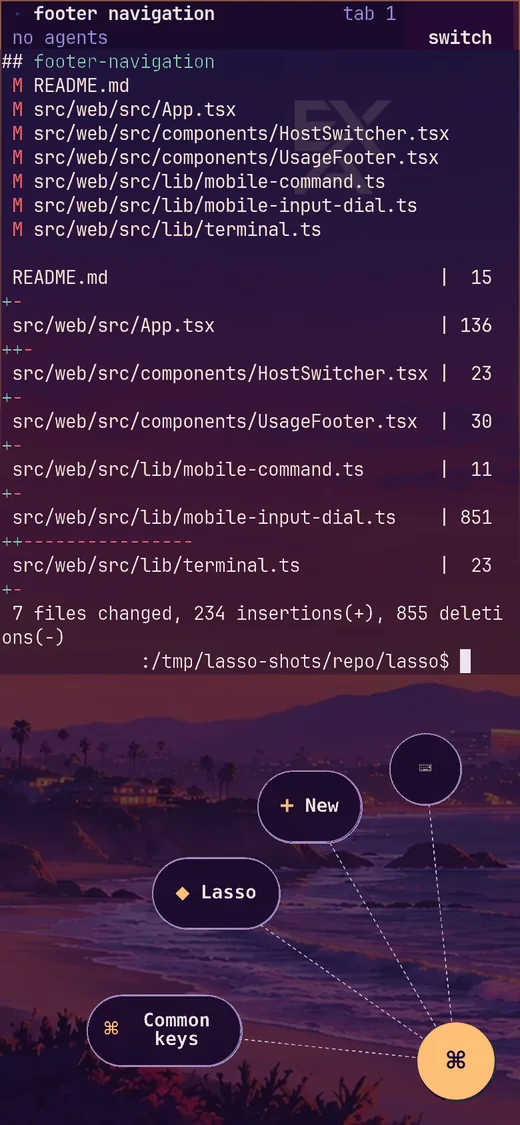
Real captures from isolated demo workspaces.
An agent that has been waiting forty minutes on a y/n you never saw is an agent doing nothing.
Coding agents block on tool approvals, plan gates and questions, and nothing tells you. Run a few of them across a laptop, a server and a box in the closet and you spend your day checking terminals.
lasso watches all of them and pushes to your phone when one is stuck. Approve the tool call from the couch. Read the diff on the train. Hand the agent a photo of the whiteboard from your camera roll.
Who it’s
for.
People who run Claude Code, Codex, OpenCode or omp in herdr, on more than one machine, and would rather not sit in front of all of them.
- 01
One person, many agents
The whole fleet in one tab: every SSH-reachable machine, its herdr session, every pane. Two browser tabs can sit on two machines at once.
- 02
Away from the desk
A home-screen app with a radial dial for Esc, Ctrl, Tab and arrows, a text field so dictation works, and file and photo upload straight to the agent’s host.
- 03
Agents that run agents
An MCP server lets one agent spawn, list, inspect and close the others, across the fleet, and ping you on purpose when it needs a decision.
What’s
in it.
Your real terminal in the middle, lasso around it, never in front of it. The sidebar follows herdr’s focused pane, so switching agents switches all of it at once.
- 01
Your real terminal, anywhere
The middle column is your actual herdr session over ttyd: same keys, same theme, same panes.
- 02
It tells you when an agent is stuck
Web Push to a locked phone when an agent blocks on a tool approval, a plan gate or a question, on any host.
- 03
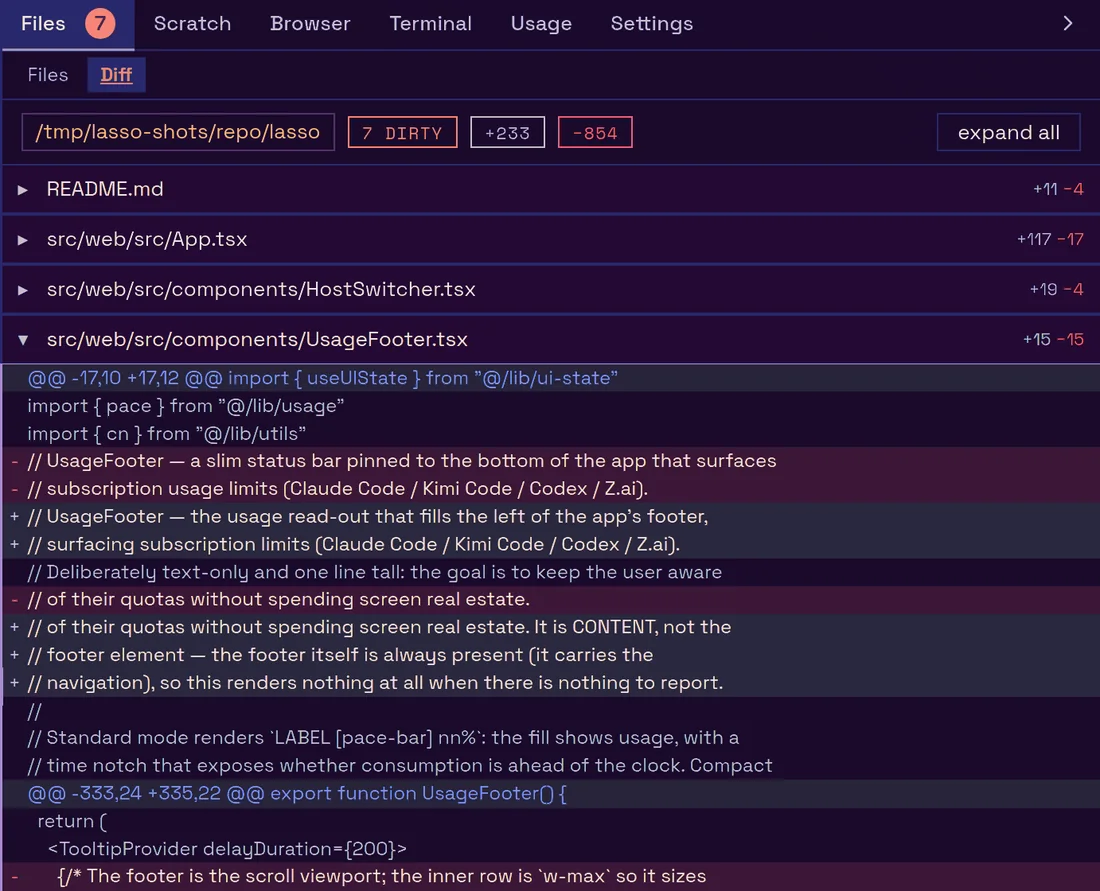
The diff the agent made
A live git diff and a file browser and editor, rooted on the machine the focused pane is actually working on, even over SSH.
- 04
A browser you share
A real Chromium streamed into the sidebar. You watch, and click in, the same pages an agent drives over the DevTools Protocol, with separate profiles for separate logins.
- 05
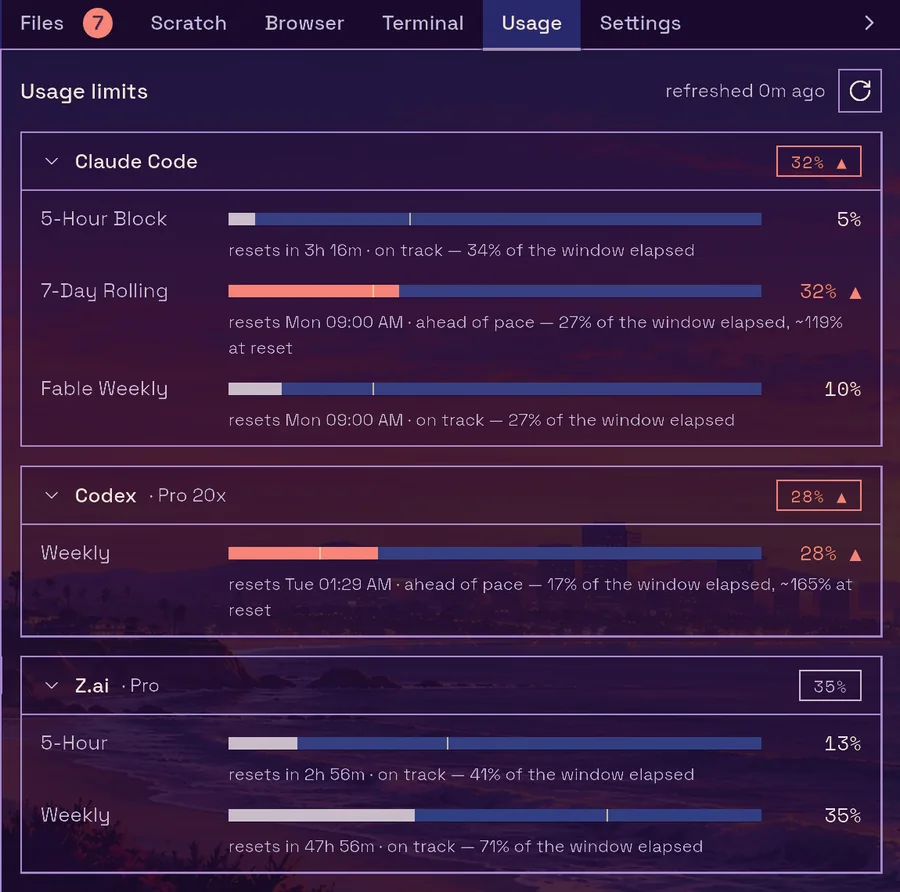
What your agents are burning
Each provider’s 5-hour and weekly budgets in the footer, with pace, so you see a budget running out before an agent stops mid-task.
- 06
Nothing to deploy
One Go binary: no database, no container, no sidecar. It spawns its own terminals and embeds its own frontend. Plugins add tabs and tools.
Agents can
ask for you.
The binary is also its own control surface. An agent with a shell can reach you, show you a file, or call any of lasso’s MCP tools.
# from inside an agent's session
$ lasso notify "the migration drops 2 columns — safe to run on prod?"
$ lasso open docs/plan.md   # on your screen, in the sidebar

# register lasso's two MCP servers with every agent CLI here
$ lasso connect# lasso, at /mcp
create_agent list_agents get_agent close_agent
list_hosts whoami notify open_file shared_browser
# lasso-browser, at /browser-mcp
# chrome-devtools-mcp against the shared Chromium:
navigate, click, fill, screenshot, console, network…Quick
start.
lasso runs where herdr runs. This release targets herdr v0.9.0; upgrade herdr on the host and its remote machines together.
- 01
Install and start it
$ curl -fsSL https://executionassociates.com/install-lasso | sh
$ lasso start            # in the background
$ open http://127.0.0.1:8090
lasso doctorchecks herdr, the socket, the port and the version if anything looks off.lasso sends anonymous usage analytics: which features get used, never your code, prompts or machines. The installer asks first;
LASSO_TELEMETRY=0or--no-telemetryinstalls with them off, and Settings orlasso telemetry offturns them off later. Exactly what is sent. - 02
Connect your agents
lasso connectfinds Claude Code, Codex, OpenCode and omp on the machine and registers lasso’s two MCP servers with each. Re-running it is safe. - 03
Put it on your phone
Push notifications need an HTTPS origin: a Cloudflare tunnel behind Access, or your tailnet over HTTPS. Then add it to your home screen.
- 04
Put it on your Mac
Download Lasso for Mac, the native app for a running lasso: an inbox of the agents that need you, agent windows with chat, and a New Agent form, on a rail at the edge of your screen. On first launch it asks for your lasso’s address and whether to send anonymous usage analytics (change it any time); after that it updates itself. Apple silicon, macOS 14 or later.
Keep it private. lasso’s MCP and browser endpoints are open by default, which is fine on loopback, a private tailnet or behind Cloudflare Access. The shared browser can act as you on every site its profile is logged into, so only log in where you’re happy for your agents to do the same.
The
documentation.
Straight from the lasso repository, rebuilt with every deploy of this site.
Guides
Getting started
- Getting startedInstall lasso, start it, open the UI and check the install with lasso doctor.
- Connect agentsRegister lasso's MCP servers with the agent CLIs on a machine, with lasso connect or by hand.
- Phone setupThe simple phone app at /m, the home-screen install over HTTPS, and push notifications chosen per device.
- Mac appLasso, the native macOS client for lasso: install it from the release DMG, connect it to your lasso by address, and keep it updated.
Concepts
- ConceptsThe mental model behind lasso - hosts, herdr sessions, agents, the shared browser and notifications.
- HostsHow lasso finds the machines it can drive, how a browser tab picks one, and how the sidebar follows the machine a pane is really working on.
- AgentsWhat lasso does when it creates an agent, which agent CLIs it can launch, and how agent records track herdr's panes through to closing.
- The shared browserA real Chromium on lasso's machine that you watch in the Browser tab while agents drive it, with several browsers, remote browsers and resource caps.
- NotificationsWhat lasso notifies you about, how each device chooses what may interrupt it, how agents send one on purpose, and how delivery is reported honestly.
Overview
- OverviewHow lasso's browser interface is laid out on a desktop and on a phone, the first-run tour, and every keyboard shortcut.
- TerminalThe herdr terminal, pasting and uploading files, the phone input dial and touch gestures, and the chat and Agents views.
- SidebarEvery built-in sidebar tab (Files and Diff, Scratch, Browser, Terminal, Agents, Usage and Settings) and how to arrange or hide them.
- New agentEvery field of the New dialog for starting a coding agent or a plain terminal on any host, its defaults, and the settings that shape it.
- ThemingHow lasso themes the terminal, the interface and your agent CLIs, from bundled and Omarchy themes to appearance modes, backgrounds, plugin fonts and fleet-wide sync.
- BotsThe Bots view, where lasso's long-lived agent sessions read like a messaging app, and every setting a bot runs with.
Overview
- OverviewThe two MCP servers lasso exposes, what each is for, how agents connect to them, and how they are secured.
- ToolsEvery tool lasso's /mcp server registers, with its parameters, defaults, return values and scope rules.
- Browser toolsHow agents drive lasso's browsers through the browser_* tools on lasso's own /mcp, or directly over CDP at /cdp, and the etiquette of a browser a human is watching.
- Shell commandsReach lasso's MCP tools from a terminal with lasso mcp, lasso notify, lasso open and lasso closeme.
- Herdr MCPherdr's own socket API as MCP tools at /herdr-mcp, one tool per herdr method, on any host lasso drives.
- OAuthGate /mcp in lasso itself with MCP_OAUTH, the OAuth flows and scopes it supports, and how its tokens work beside Cloudflare Access.
- Agent scopeBound which hosts' agents an MCP caller can see and manage, with per-host credentials and host groups.
Using plugins
- Using pluginsAdd sidebar tabs, main window views, MCP tools, themes and fonts to lasso, and the trust model that keeps a plugin from doing more than you approved.
- Writing pluginsThe plugin manifest, sidebar tabs, main window views and their message bridge, MCP servers in isb sandboxes, themes, fonts and chat styles.
Overview
- OverviewHow to run lasso so you can reach it from other devices without exposing a writable shell to the internet.
- systemdKeep lasso running with a systemd user unit, or with the built-in lasso start background mode.
- CloudflarePublish lasso on an HTTPS hostname through a Cloudflare tunnel, gated by Cloudflare Access, with lasso verifying every request.
- TailnetServe lasso on your tailnet over HTTPS with -tailnet, with every caller identified by the tailnet and only you let in by default.
- UpdatingUpdate lasso with lasso update, what it restarts, and how to update herdr on lasso's machine and on your other hosts.
Reference
- ReferenceExact flags, environment variables, files, routes and internals of the lasso binary.
- CLIEvery lasso subcommand, its flags and its aliases.
- ConfigurationEvery lasso server flag with its default, and every environment variable lasso reads.
- FilesWhat lasso reads and writes on disk, on its own machine and on the hosts it drives.
- HTTP routeslasso's route table, and which auth gate guards each route.
- ArchitectureHow the lasso binary, ttyd, herdr, SSH, the shared browser and the phone fit together.
- DevelopmentBuilding lasso from source, the dev loop, and cutting a release.
- AnalyticsExactly what anonymous usage analytics lasso and the Mac app send, and every way to turn them off.
Rendered from execution-associates/lasso/docs at main@0207592.
Want coding agents working for your team, on your machines, with a human in the loop? We built lasso, and we set it up.
Put us on it