
The shared browser
The shared browser is a headless Chromium that lasso runs on its own machine. You see it in the sidebar's Browser tab, streamed live, and can click, scroll and type in it. Your agents drive the very same browser through the browser_* tools on lasso's MCP server, or over the Chrome DevTools Protocol (CDP). An agent testing a login flow opens its page there, and you watch it happen, and can take over, from your desk or your phone.
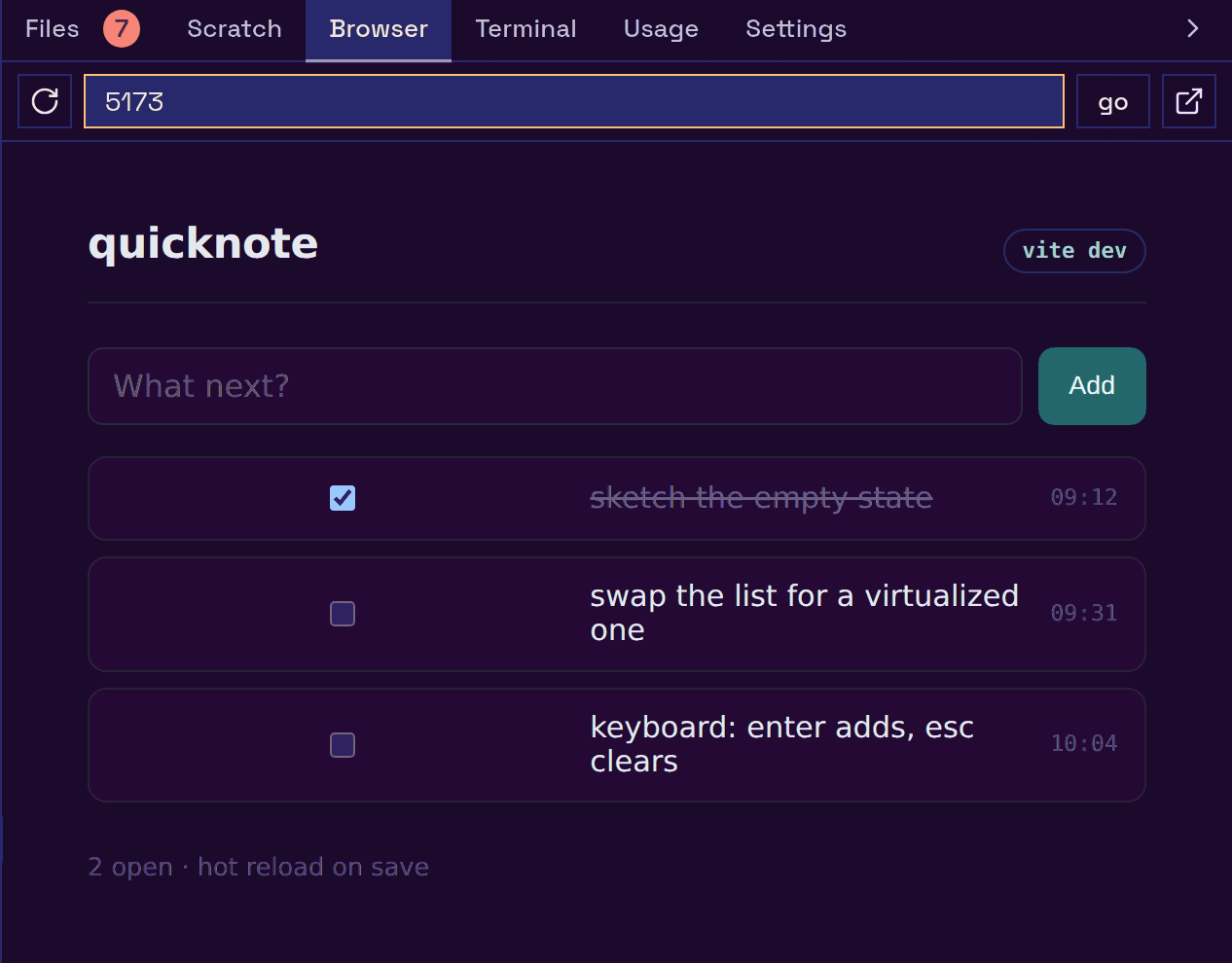
What you and agents each see#
- Agents drive it with the
browser_*tools on lasso's own MCP server at/mcp(chrome-devtools-mcp's tools:browser_new_page,browser_click,browser_take_screenshot, …), or with raw CDP at/cdp, for Playwright or any CDP client; a plainGET /cdp/browserslists every browser and its CDP address. Details are in The browser tools. - You see it in the Browser tab's Agent mode, which shows a tab strip of the current browser's pages and follows the newest one. When an agent opens a page you land on it; open one yourself and the agents can see it too.
localhostmeans lasso's machine. A bare port typed into Agent mode (5173) openshttp://localhost:5173on lasso's machine, whatever host your browser tab is on. There is one shared browser per lasso, not one per host.
The Browser tab has a second mode, Iframe, which is a plain iframe in your own browser with nothing in between and none of the sharing. Which mode the tab opens in is stored on the server, so every device agrees. Links you click in a terminal open in the Browser tab too, in Iframe mode unless the page can only be shown in Agent mode. Sidebar covers both modes, the toolbar and the terminal-link behavior.
Because Agent mode is a real browser streamed to you rather than a page framed inside lasso, none of an iframe's limits apply: no mixed-content block, no private-network block, no site refusing to be framed.
Finding Chromium#
Install Google Chrome or Chromium on the machine lasso runs on. lasso takes the first of:
-browser/LASSO_BROWSER: a path or a name onPATH. If it doesn't exist, lasso reports that rather than silently picking something else.offdisables the shared browser.chromium,chromium-browser,google-chrome-stable,google-chrome,chromeonPATH.- The newest Playwright Chromium in
~/.cache/ms-playwright. - On macOS,
Google Chrome.apporChromium.appin/Applications.
With none found, the Browser tab falls back to Iframe mode and says why. Installing Chromium later brings Agent mode back on its own.
On Ubuntu 23.10 and later, Chromium's sandbox needs unprivileged user namespaces, which Ubuntu grants only to binaries with an AppArmor profile. Playwright's download, or any Chromium you unpacked yourself, fails with "No usable sandbox!", and Settings shows that message. lasso does not fall back to --no-sandbox on its own. Install a packaged Google Chrome or your distro's Chromium (Ubuntu ships profiles for those), add an AppArmor profile granting userns to your binary, or knowingly run unsandboxed with LASSO_BROWSER_ARGS=--no-sandbox. Running lasso as root adds --no-sandbox automatically, because Chromium refuses to start as root without it.
It costs nothing until used#
Chromium starts on the first /cdp connection, when you open the Browser tab in Agent mode, when an agent calls the shared_browser MCP tool, or from Settings → General → Terminal & browser. It stops again after -browser-idle (default 15 minutes) with no CDP client connected. The Browser tab only holds a connection while it is visible, so a closed sidebar or a backgrounded phone doesn't keep it alive.
The /cdp address is stable: it survives Chromium stopping and restarting, so it is safe to put in an agent's configuration.
Resource caps#
Headless Chromium on a machine without a GPU renders in software and will take several cores if you let it. On Linux, when systemd-run is on PATH and a user systemd manager is reachable (XDG_RUNTIME_DIR is set), lasso launches Chromium inside a transient systemd-run --user --scope with a CPU quota and a memory high-water mark. Without those, on macOS, or with both limits set to off, it runs uncapped. Settings shows which. If a capped launch fails, lasso retries once uncapped.
The defaults are a quota of 200% CPU (two cores) and a 2G memory high-water mark, and Chromium renders at device scale factor 2 so the Browser tab is sharp on a HiDPI screen. -browser-cpu, -browser-mem, -browser-scale, -browser-idle, -browser and LASSO_BROWSER_ARGS change them; Configuration lists each with its environment variable.
The caps apply per browser: each running browser is its own Chromium under its own scope.
Several browsers#
A lasso can run several shared browsers, each with its own cookies, logins and storage. Each is its own Chromium process, started on first use and idle-stopped on its own, so an unused browser costs nothing.
- The default browser always exists and can't be deleted (it can be renamed). Its data lives in
~/.lasso/browser-profile. - Other browsers keep their data in
~/.lasso/browser-profiles/<id>. An id is 1 to 32 lowercase letters, digits or dashes; names are unique, ignoring case. A lasso can have up to 32 browsers. - Deleting a browser deletes its directory, and every login in it.
You pick and manage browsers from the bar along the bottom of the Browser tab in Agent mode. Agents manage them with the list_browsers, create_browser, update_browser and delete_browser MCP tools, and choose which browser a browser_* tool runs in by passing browser (an id or display name) to it. Omitted, it runs in the default browser. A browser created later works at once, with no reconnect.
Cookies and logins persist across restarts. Open tabs do not: an idle stop closes them.
Remote browsers#
A browser with a cdp_url is one lasso dials rather than launches: a Chromium already running on another machine, in a container or behind a tunnel, or a hosted CDP service such as Kitesurf, reached at its DevTools HTTP base (http://host:port or https://host). Set it with create_browser or update_browser. lasso never starts or stops a remote browser.
lasso passes no proxy settings to any browser. To send a browser's traffic through a proxy, configure it in the browser itself (for a launched Chromium, LASSO_BROWSER_ARGS).
Running two lassos#
Two lasso instances can't share one browser's data directory. If a second lasso (a dev build next to your main one, say) finds it in use by a live lasso, it refuses to launch rather than taking the browser away from the first. Give the second instance its own LASSO_DIR.
Security#
Whoever can reach /cdp or call the browser_* tools has full control of that browser: they can read every page, type into it and navigate it, including every site it is logged into. Only log a browser into an account you're happy for every agent that can reach lasso to act as you on.
/cdpand thebrowser_*tools are open by default on lasso's loopback listener, and take whoever-tailnetor-listen-accessidentified. WithUI_AUTHset they need its basic credentials, which makes them stricter than the rest of/mcp, whichUI_AUTHdoes not gate: abrowser_*call without them is refused as a tool error. WithMCP_OAUTHset they take what/mcptakes (a lasso bearer token or theUI_AUTHcredentials), and a per-host token must include lasso's own machine in its scope.- Whatever the auth setting, lasso refuses a
/cdprequest or abrowser_*call that a different website sends from your browser, so a page you visit can't drive a lasso running on your own machine. - Chromium and lasso's chrome-devtools-mcp processes get an environment without lasso's credentials (
UI_AUTH,MCP_OAUTH,LASSO_MCP_TOKEN).
See Security for the full model and The browser tools for how an agent authenticates.