
Plugins
A plugin is a directory with a plugin.json manifest. It can add any mix of four things:
- Sidebar tabs: a web page of its own, in the sidebar strip next to Files and Browser.
- Main window views: a web page that fills the main window, picked from the footer's view menu beside Terminal, Chat and Grid.
- MCP tools: tools on lasso's
/mcpserver, named<plugin>__<tool>, so every agent connected to lasso can call them, and so canlasso mcp. - Themes: Omarchy-format palettes that join the theme picker like any other theme.
- Fonts: font files that become choices in Settings → Themes → Typography.
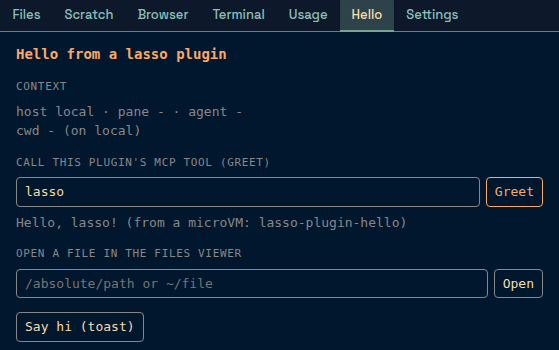
This page is about installing and running plugins. To write one, see Writing a plugin.
Try one#
The lasso repository ships two examples. hello has a tab and one MCP tool; harbor has a theme and a font.
lasso plugin install execution-associates/lasso/examples/plugins/hello
lasso mcp hello__greet --name you
install shows exactly what the plugin asks for, then asks before installing and enabling it. hello's MCP server runs in a sandbox, so it needs isb (below); its tab works without it.
The trust model#
A manifest is written by whoever wrote the plugin, so nothing in it can grant itself anything. Three rules follow from that.
Nothing runs until you enable it. A new plugin is disabled. Enabling it shows you its permissions and approves exactly those: its tabs' and views' pages and URLs, the container image (and VM image, if it names one) and command of its MCP server, the network hosts that server may reach, the names of its environment variables, which secret may be sent to which host, and its theme and font ids. lasso stores a fingerprint of that set in its own database. If a later edit to the manifest changes any of it, the plugin reads needs approval and its tabs and MCP server stop loading until you approve the new set. Edits that are not permissions (the version, the description, a label or icon, a palette) take effect without asking. lasso rescans the plugins directory every 10 seconds, so edits are noticed without a reload.
Its MCP server runs in a sandbox. By default lasso runs a plugin's server in an isb sandbox: an unprivileged container, with the plugin directory mounted read-only, one writable data directory, nothing else from your machine, and no network except the host names it listed (isb's egress proxy enforces the list). Secrets never enter the guest: the guest holds a placeholder, and isb puts the real value on the wire only toward that secret's approved hosts. Two switches are yours alone, and no manifest field can set either:
- VM runs the sandbox as a virtual machine with its own kernel instead of a container, so a kernel exploit inside it does not reach your machine. It starts much more slowly than a container.
- Trusted runs the server directly on your machine as your user, outside any sandbox. It wins over the VM switch. Even a trusted server gets a minimal environment and never sees lasso's own credentials.
Its tabs cannot call lasso. A tab's page is served as an opaque, sandboxed origin, so it cannot use your session to reach lasso's API (whose file endpoints can read and write anything you can). What a tab can do goes through a small message bridge: read the focused pane and the theme, open a file in the viewer, call its own plugin's tools, and show a toast. A tab that frames an outside URL gets no bridge at all.
isb#
Sandboxed plugins need isb 1.0 or later on lasso's machine, and isb serve running as the same user as lasso: it runs the egress proxy, and a sandbox created while it is down would have no working network, so lasso refuses to start one. lasso finds isb through LASSO_ISB (a path or a PATH name; when set, nothing else is tried), otherwise the first new-enough of isb on PATH and the newest mise install of it, which covers a systemd unit whose PATH lacks your shell's additions. LASSO_ISB=off disables sandboxed plugins. To install it:
mise use -g github:execution-associates/isbWithout a usable isb, tabs, themes and fonts still work, and each untrusted MCP server reads unavailable with the reason until you fix it and restart the server. The Plugins group in Settings (and lasso plugin list) shows which isb lasso found, or why it found none. The authoring guide has the details, including the firewall step a host with ufw needs.
A container starts in a few seconds; a VM takes much longer. The first start of an image also downloads it.
Installing#
There are three ways to get a plugin into ~/.lasso/plugins/ (or $LASSO_DIR/plugins/):
From GitHub. The source is owner/repo, owner/repo/sub/dir, or a https://github.com/owner/repo/tree/<ref>/<subdir> URL. Only GitHub is supported.
lasso plugin install owner/repo[/subdir] [--ref v1.2] [--no-enable] [-y]lasso shallow-clones the repository into a hidden staging directory, with git hooks off and submodules skipped, refuses anything over 50 MB or 5000 files or with a symlink pointing outside the plugin, and validates the manifest. Then it shows every permission, the source and the exact commit, and asks. "Install and enable" approves exactly what the preview showed; if the staged files changed in between, the confirm is refused. --no-enable installs it disabled. Without a terminal, install refuses unless you pass -y. lasso records the source, ref and commit.
Linked. Use a checkout where it is, without copying it. This is how you develop a plugin.
lasso plugin link ~/src/my-plugin [--enable]
lasso plugin unlink my-plugin        # forgets the link; files untouched
By hand. Copy a plugin directory into the plugins directory, then enable it. The directory name must equal the manifest's name.
cp -r my-plugin ~/.lasso/plugins/
lasso plugin enable my-plugin
A name belongs to one plugin: install and link refuse a name that is already installed, linked or hand-placed.
Finding plugins#
Public plugins carry the GitHub topic lasso-plugin. Anyone can apply a topic to their own repository, and nobody reviews it, so it is a way to find plugins, not a catalog that vouches for them. What keeps you safe is the approval and the sandbox, so read the permissions before you approve.
Managing plugins#
lasso plugin list [-json]           # state, isolation, MCP status, source, tools
lasso plugin enable <name>          # prints the permissions it approves
lasso plugin disable <name>         # unload and withdraw the approval
lasso plugin trust <name>           # run its MCP server on the host
lasso plugin untrust <name>         # back into its sandbox
lasso plugin vm <name> on|off       # run its sandbox as a VM, or a container (the default)
lasso plugin restart <name>         # restart its MCP server
lasso plugin reload                 # rescan the plugins directory
lasso plugin update <name> [-y]     # re-fetch a GitHub install
lasso plugin uninstall <name> [--purge-data]
lasso plugin log <name> [-n 200] [-f]
lasso plugin data-dir <name>
These talk to the running lasso (through LASSO_URL or LASSO_LISTEN, sending UI_AUTH if set), because enabling a plugin starts a process only the server can own. The full flag list is in the CLI reference.
- States. A plugin is
disabled,enabled,needs_approval(its permissions changed since you approved them) orinvalid(a broken manifest, a missing linked path, a lasso too old for it, or the wrong OS, with the reason shown). - MCP status. An enabled plugin's server is
starting,running,stopped,errororunavailable. A server that dies is restarted with backoff.unavailablemeans a retry would not help (no isb 1.0 or later,isb servenot running, or a secret that did not resolve): fix the cause, then restart it. - Update re-fetches a GitHub install's recorded source and ref, shows the new commit, and says whether the permissions change. Unchanged permissions keep their approval; changed ones read
needs_approvaluntil you approve them. If swapping the new files in fails, the old ones are put back. - Uninstall removes a GitHub install, forgets its approval, trust and isolation, and deletes any of its secrets left in isb's store. It works on GitHub installs only. A linked plugin is removed with
unlink, and a hand-placed one is never deleted by lasso: delete its directory yourself. - Trust and isolation survive a disable. Changing either restarts the server, since a server cannot move between a container, a VM and the host in place. The VM switch is kept but has no effect while the plugin is trusted.
- Two lassos on one plugins directory. Only one lasso at a time runs the MCP servers for a plugins directory: whichever holds the lock file
plugins/.runner.lock. A second lasso sharing the sameLASSO_DIRstill serves every plugin's tabs, themes and fonts, and lists each MCP server asunavailablewith "plugin servers run in the other lasso using this plugins directory", naming that lasso's pid and listen address. When it stops, the other takes the servers over within a rescan.
In Settings#
Settings → General → Plugins does the same from the browser: install from GitHub (with the same permission preview), enable, disable, choose Container or VM, trust, restart, update, uninstall, view logs, and see each server's MCP status. A plugin waiting for approval shows in the group's header in a warning colour, even while the group is closed. Enabling shows the permissions in a dialog first, and approves the exact set that dialog showed: if the manifest changed while you were reading, the approval is refused.
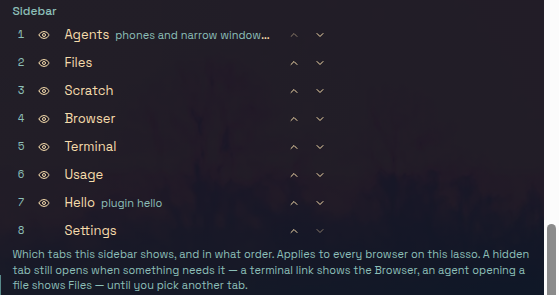
Settings → General → Sidebar & usage arranges the sidebar strip: which tabs show and in what order, built-in and plugin tabs alike. Settings itself cannot be hidden. The layout is stored on the server, so every browser on the same lasso follows it, and a disabled plugin's tab returns to its place when you enable it again.
Themes and fonts#
Themes and fonts are data, never CSS. A plugin cannot ship a stylesheet, because CSS that could restyle lasso could also hide the warnings in the approval dialog. It supplies values, and lasso writes every line of CSS itself.
- A plugin theme joins the same registry as lasso's own themes: it can be herdr's theme or an appearance palette, paints the chrome and the terminals, is written into the agent CLIs' theme files, syncs across the fleet, and its wallpapers show in the background gallery. It never replaces an existing theme: if its id is already taken, that theme is skipped with a warning and the rest of the plugin loads.
- A plugin font becomes a choice in Settings → Themes → Typography, for the interface, display headings, labels, code, or the terminal (the last two offer monospace fonts only). The terminal keeps its Nerd Font as a fallback, so TUI icons still render.
Disabling the plugin withdraws its themes and fonts; selections naming them fall back to the defaults, and come back when you enable it again.
lasso plugin install execution-associates/lasso/examples/plugins/harborData and logs#
A plugin cannot write to its own directory. Its one writable place is ~/.lasso/plugin-data/<name>/ (mode 0700), mounted at /data in the sandbox, with LASSO_PLUGIN_DATA pointing at it. An update replaces the plugin directory but leaves the data directory alone, and uninstall keeps it unless you pass --purge-data. lasso plugin data-dir <name> prints the path.
lasso plugin log <name> (or the Logs button in Settings) shows a server's recent output; -f follows it. A server's stderr streams into lasso's own log too, and lasso keeps the last 500 lines per plugin in memory, across restarts, sandboxed or trusted alike. When a server fails to start or dies, its last lines of output are in its MCP status.